

How to Resolve Anduin Login Issues: A Quick Guide
If you have any trouble logging into Anduin platforms, please check the following solutions. 1. Log in using the correct email address Ensure you are u
If you have any trouble logging into Anduin platforms, please check the following solutions.
1. Log in using the correct email address
- Ensure you are using the email address that received the original invitation.
2. Whitelist Anduin domains
Your access to Anduin might be blocked by a firewall. To resolve this, ask your network administrators or IT team to whitelist the following domains:
For US customers
- sign.anduin.app for Sign app
- dataroom.anduin.app for Data Room app
- fundsub.anduin.app for Fund Subscription app
- id.anduin.app for login
- investoraccess.anduin.app for Investor Access app
- api.anduin.app for public API
- nats.anduin.app to live sync data
- platform.anduin.app for Investor Data Management app
- cdn.anduin.app for icons, fonts, small images, etc… (this will be soon be used for both U.S. and EU)
- docs.anduin.app to download documents
- doc-server.anduintransact.com to view excel files
- mail.anduin.app to receive email from Anduin
- sftp.anduin.app to sync files
- gondor-temp-upload-production.s3.amazonaws.com to upload documents
- integrations.anduin.app and integration-platform.anduin.app for Integration Hub
For EU customers
- api.eu.anduin.app for public API
- dataroom.eu.anduin.app for Data Room app
- deals.eu.anduin.app for main app
- doc-server.eu.anduintransact.com to view excel files
- docs.eu.anduin.app to download documents
- fundsub.eu.anduin.app for Fund Subscription app
- id.eu.anduin.app for login
- mail.eu.anduin.app to receive email from Anduin
- nats.eu.anduin.app to live sync data
- platform.eu.anduin.app for Investor Data Management app
- gondor-eu-temp-upload-production.s3.eu-west-1.amazonaws.com to upload documents
- integrations.eu.anduin.app and integration-platform.eu.anduin.app for Integration Hub
If you, your network administrators, or your IT team have any questions about whitelisting these domains, please reach out to our support team at support@anduintransact.com.
3. Clear browser cache and cookies
You can try clearing your web browsers’ cache and cookies.
Note: Clearing your browser's cache and cookies will log you out of all current website sessions.
Chrome
- On your computer, open Chrome.
- In the upper right corner, click the (⋮) menu.
- Click More tools and select Clear browsing data.
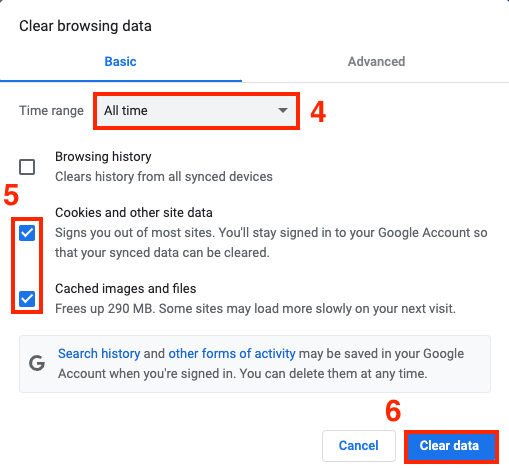
- Choose a time range from the dropdown list. To delete everything, select All time.
- Check the Cookies and other site data and Cached images and files boxes.
- Click Clear data.
Safari
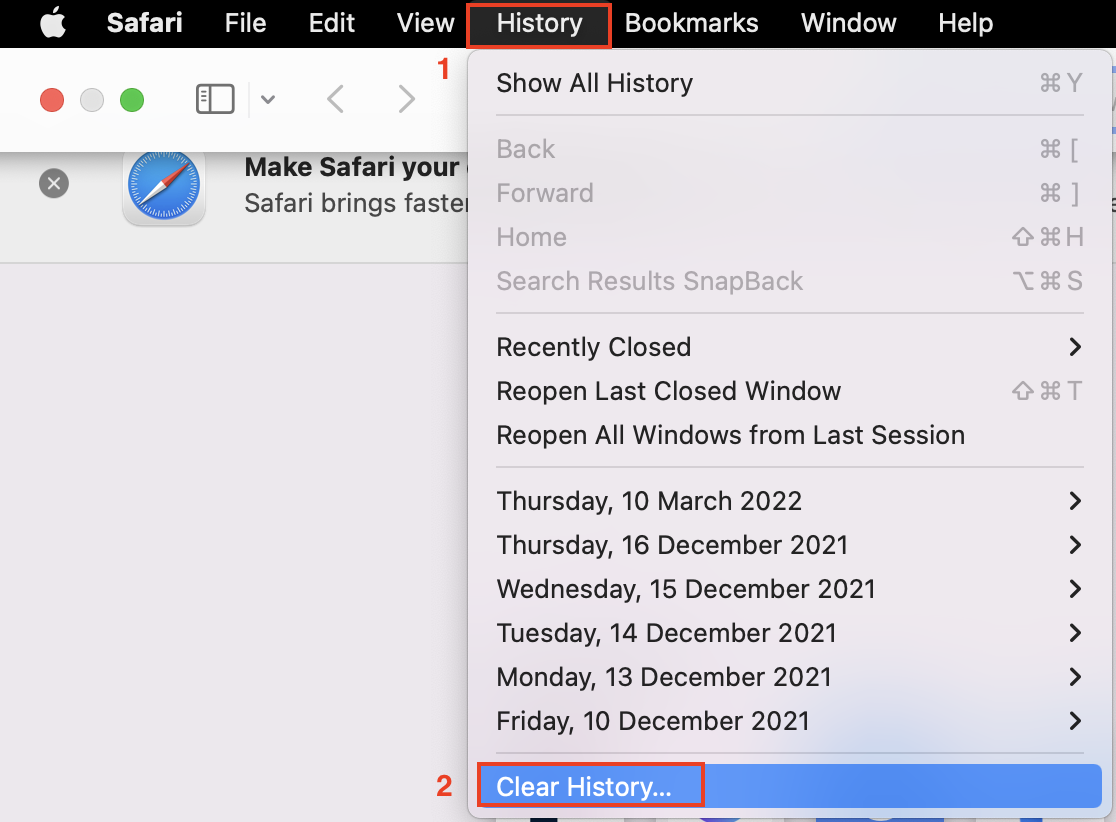
- Open Safari on your computer, choose History, and select Clear History.
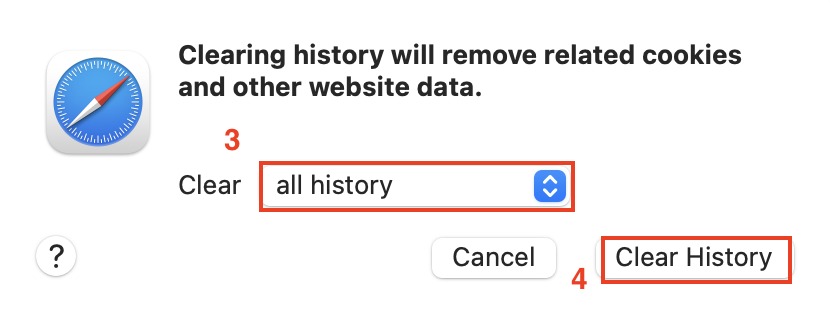
- Choose a time range from the dropdown list. To delete everything, select All history. Then click Clear History.
4. Update your web browser
An outdated browser can sometimes cause issues with web-based applications. For security reasons, our platform supports only the latest two versions of each browser.