

Add Search Bar to Data Room
Public
Data Room has an ability to add in a search bar to make it easier for participants to find the document they are looking for quickly. Enable Search Ba
Data Room has an ability to add in a search bar to make it easier for participants to find the document they are looking for quickly.
Enable Search Bar
- In Data Room, go to the the Settings tab:

- Under Settings, enable Documents Search:

- At the bottom of the screen click Save:

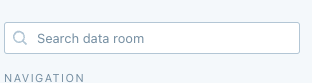
- You should now see the search bar under the Documents tab:
Was this page helpful?